
Identify the TPI on your reciprocating saw blade, which is typically marked near the teeth and represented by numbers like 6 or 20. This TPI, or teeth per inch, is a crucial factor in determining how your saw cuts through different materials.
Adjust your blade choice based on the TPI number; selecting the correct TPI can mean the difference between a clean, smooth finish and a rough or slow cut. For delicate or precise work, opt for a higher TPI, above 18, to achieve smoother results.
Conversely, a lower TPI, between 6 and 14, is better suited for faster cuts on thicker or softer materials.
Skipping the step of checking and selecting the appropriate TPI can lead to subpar results, including increased wear on the blade or damage to the material being cut. To ensure optimal performance and quality cuts, learn how to choose the proper TPI for each project, considering the material type and desired finish.
What Is TPI on a Reciprocating Saw Blade?
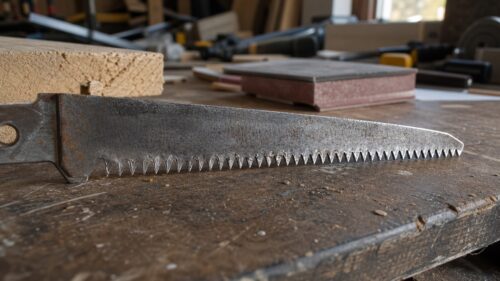
To understand what TPI is on a reciprocating saw blade, start by examining the blade itself. TPI, or teeth per inch, measures the number of teeth within one inch of the blade’s length. Use this to identify the blade’s density, which influences how fast and smooth your cuts will be. A blade with lower TPI (6-18) cuts faster but rougher, while higher TPI (24+) provides cleaner, precise cuts. When choosing a blade, consider the material you are cutting, such as wood or metal. The blade material also affects cutting performance, so select the right TPI and blade type for your specific project. Understanding the tooth design can further help optimize your cutting results.
How TPI Affects Cutting Speed and Finish Quality
Select the appropriate TPI, or teeth per inch, on your saw blade based on your cutting needs. Higher TPI blades create smoother cuts and better surface finishes, but cut more slowly, so use them for fine work. Lower TPI blades remove material faster, producing rougher cuts ideal for demolition or framing. Increasing TPI from 6 to 24 considerably improves finish quality, especially in metals or delicate materials. Use a blade with the right TPI to balance cutting speed and surface smoothness. Adjust TPI according to material type and desired finish: higher TPI for detail work, lower TPI for quick, rough cuts. Blade material also influences optimal TPI selection, ensuring durability and efficiency for your specific task.
Which TPI Is Best for Softwoods and Hardwoods?
Determine the type of wood you are cutting, softwood or hardwood. Select a blade with the correct TPI based on material thickness and desired finish. For softwoods, choose a TPI between 10-18 to allow faster, rougher cuts. This blade range removes material quickly and is ideal for larger or less detailed cuts. For hardwoods, select a TPI around 18-24 to produce smoother, finer cuts. Higher TPI blades reduce tear-out and improve finish quality. Proper blade selection guarantees ideal cutting speed and finish. Ignoring TPI guidelines can cause excessive heat, blade wear, or poor cut quality. Always match TPI with the wood type for best results. Blade flex can also impact cut quality depending on the material and TPI choice.
Choosing the Right TPI for Metal Cutting Tasks
When cutting metal with a reciprocating saw, choose the correct TPI (teeth per inch) for the task. The TPI affects blade speed, cut quality, and blade wear. For ferrous metals like steel, select a TPI of 14-32 to balance speed and finish. For non-ferrous metals like aluminum and copper, use a TPI of 32-64 for smoother cuts. Use lower TPI blades (14 or less) for thick or fibrous metals, and higher TPI blades (18-24+) for thin sheets to prevent burrs. Proper TPI selection reduces blade wear, improves cut quality, and makes metal cutting safer and easier. Understanding metal-cutting blade selection can help optimize your cutting approach for different metals.
What TPI Works Best for Plastic and Composite Materials?
Use a TPI (teeth per inch) between 10 and 14 for plastic cutting and composite materials. Select blades with this range to balance speed and cut quality, reducing melting, burning, or cracking. For softer plastics like acrylic, opt for higher TPI blades around 32-64 to produce smooth, clean edges. For thicker composites, low TPI blades around 10 can cut faster but may result in rougher edges. Choose blade materials that resist melting and provide durability. Proper blade selection ensures a cleaner cut and better smoothing of edges, while avoiding damage caused by inappropriate TPI, such as excessive melting or rough finishes. Additionally, understanding the performance characteristics of different TPI ranges can help optimize cutting efficiency and finish quality.
Understanding TPI Ranges: Low, Medium, and High Explained
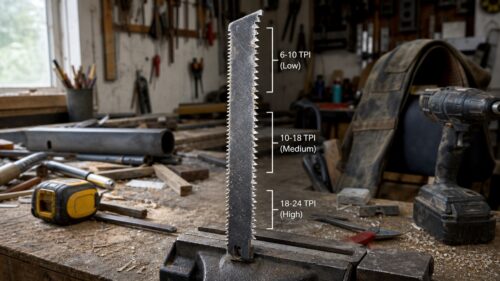
Understanding TPI ranges is important for choosing the right blade for your project. Different TPI, or teeth per inch, determine cut quality and speed. Use low TPI blades, with 3 to 8 teeth per inch, for rough cuts in thick or soft materials. Medium TPI blades, 10 to 14 teeth per inch, suit versatile tools for balanced cutting. High TPI blades, 18 or more teeth, produce smooth, precise cuts in thin materials. The table below clarifies these ranges:
| TPI Range | Best Use | Cut Type |
|---|---|---|
| Low | Thick, soft materials | Rough cuts |
| Medium | Wide variety, general use | Smooth & quick cuts |
| High | Fine, delicate materials | Precise cuts |
Choosing the right tooth pattern is essential for optimizing your saw blade performance based on material and desired cut quality.
How Blade Material and Construction Influence TPI Choices
Select the proper blade material based on your cutting needs. Different blade materials, like HCS, HSS, bi-metal, or carbide-tipped, affect the TPI choice for ideal performance. Use higher TPI with harder materials, such as carbide, to guarantee smooth cuts and heat resistance. For softer materials, like wood, choose lower TPI with more flexible blades to maximize cutting speed and durability. Blade construction, including tooth shape and reinforcement, influences how well a blade performs under pressure.
- High TPI blades excel in dense materials.
- Low TPI blades suit softer materials or rough cuts.
Selecting TPI Based on Blade Length, Width, and Shape
When choosing the right TPI for your reciprocating saw blade, consider the blade’s length, width, and shape. Adjust TPI selection based on blade dimensions to optimize performance and efficiency. Longer blades need lower TPI for strength; shorter blades require higher TPI for finer cuts. Narrower blades have higher TPI for control; wider blades benefit from lower TPI for rough cuts. Blade shape, like plunge or straight tips, influences TPI choices to enhance cutting speed or detail. Match TPI with blade design to reduce vibration and wear, ensuring maximum blade performance and durability during specific tasks. Proper TPI selection relies on understanding these blade characteristics.
Signs You’re Using the Wrong TPI : and How to Fix It
Inspect the cut quality and saw performance regularly to identify signs of using the wrong TPI. Poor cut quality, such as rough edges, splintering, or burrs, indicates mismatched blade selection or material compatibility. If blade wear or damage occurs prematurely, the TPI is likely too low or high. Look for blade binding or breakage, which suggests incorrect TPI for material thickness. Use this table to assess your cutting problems:
| Issue | Likely TPI Problem |
|---|---|
| Rough edges | TPI too low for clean finishes |
| Blade wearing out quickly | TPI not suited for material strength or thickness |
| Blade binding or breaking | TPI mismatched to material density or thickness |
| Excessive finishing | TPI too high for quick, smooth cuts |
Tips for Maintaining Your Blades and Optimizing TPI Performance
Always keep your reciprocating saw blades clean and well-maintained to assure peak performance. Inspect and clean blades after each use to prevent debris buildup, which reduces cutting efficiency. Replace dull or damaged blades promptly to maintain optimum TPI performance and prolong blade lifespan. Store blades in a dry, organized space to prevent rust and material damage that affect cutting accuracy. Use the correct TPI for your material to guarantee best cut quality and safety. Match blade length, width, and TPI to your project needs to avoid issues like wobbling or binding, extending blade life and ensuring tool safety.
Troubleshooting Rough Cuts and Improving Cut Quality
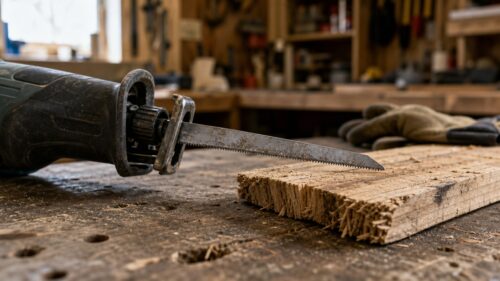
Understanding why a rough or uneven cut occurs helps improve your results. To troubleshoot, check your blade selection; a blade with too low TPI causes splintered edges and rough cuts. Use a higher TPI for smoother cuts, reducing vibrations. A mismatch between TPI and material may lead to blade binding or overheating. Adjust accordingly by selecting the right blade for the material’s hardness and finish needs.
| Problem | Solution |
|---|---|
| Rough, splintered edges | Use higher TPI blade, especially for fine, detailed cuts. |
| Uneven cuts | Match TPI to material thickness and finish expectations. |
| Blade overheating | Ensure proper TPI and correct blade for the material. |
| Blade mismatch | Replace with a properly rated, compatible blade. |
| Vibration or burrs | Increase TPI and verify blade sharpness. |
Quick Guide: Matching TPI to Your Project’s Material and Need
Determine the appropriate TPI for your project by considering the material type and thickness. A lower TPI (6-14), suitable for thick wood or metal, guarantees efficient, rough cuts so you can cut faster and avoid binding. A higher TPI (24 or more), ideal for thin plastics or veneers, delivers smooth finish quality with cleaner edges. Choose a blade where at least three teeth are in contact with the material to improve cutting efficiency and control. Proper blade selection, based on material type and thickness, helps prevent blade wear, reduces splintering, and achieves the ideal cutting speed and finish quality.
Frequently Asked Questions
What Is the Best TPI Rating for Sawzall Blades?
The ideal TPI rating for Sawzall blades balances material compatibility, cutting accuracy, and blade durability, with 10-14 TPI ideal for general woodwork; higher TPI suits metals for safety, precision, and specialized applications.
Is a Higher Tpi Better Saw Blade?
Higher TPI blades offer better cutting accuracy and smoother finishes, but may reduce blade durability and speed, especially with tough materials. They impact flexibility, cost, and safety, necessitating careful material compatibility and regular blade replacement for peak performance.
What Is a 10 Tpi Blade Used For?
A 10 TPI blade acts as a swift river, carving through softer materials, wood, plastic, thin metal, balancing durability, flexibility, and speed, ensuring cutting accuracy, safety, and an extended lifespan for those demanding freedom in demolition and renovation pursuits.
What Is 14 Tpi Suitable for Cutting?
A 14 TPI blade is suitable for fast wood slicing, drywall removal, pruning branches, plastic trimming, and pipe cutting. It excels in demolition work and flooring installation, offering efficient cutting with rough edges, ideal for those prioritizing speed.
Final Takeaways
Carefully select the right TPI for your project to guarantee excellent cutting. If you choose the wrong TPI, your cuts may be rough, slow, or inaccurate. Always match TPI to your material, finer teeth for delicate tasks, coarser for rougher cuts. Otherwise, you risk damaging your blade or workpiece. Remember, the right blade saves time and effort, providing a clean finish. Follow these guidelines to achieve professional results and prevent unnecessary errors.

- 6 Best Heavy Duty Jig Saw for 2027 - September 26, 2026
- 8 Best Jigsaw Blades for Acrylic in 2027 - September 26, 2026
- 5 Best Festool Jig Saws for 2027 (Smooth Cuts Every Time) - September 25, 2026