
An orbital reciprocating saw, commonly used by homeowners, DIY enthusiasts, and professionals alike, features a key setting called the orbital mode that significantly enhances cutting efficiency. To activate this function, locate the switch or dial on your saw designed for mode selection. Turn it to the orbital setting, which is usually marked with a numbered scale or a specific symbol indicating orbital motion.
This setting ensures that the blade moves in an elliptical or orbital path, making cuts faster and more aggressive, especially through tougher materials like thick wood or metal.
If the orbital feature is not engaged, the saw will operate with a straight reciprocating motion, resulting in slower cuts and less aggressive performance.
For tougher materials or denser workpieces where you need to speed up the process, activating the orbital mode is highly beneficial, but be mindful as it can dull blades more quickly.
Conversely, for delicate or precise cuts where blade longevity is a priority, start with the orbital setting at its lowest level.
This gentle operation helps extend the life of your blades and reduces the risk of damage to the workpiece.
Adjusting the orbital setting according to your specific application ensures optimal performance, safety, and efficiency when using your reciprocating saw for various projects.
What Is an Orbital Reciprocating Saw and How Does It Work?
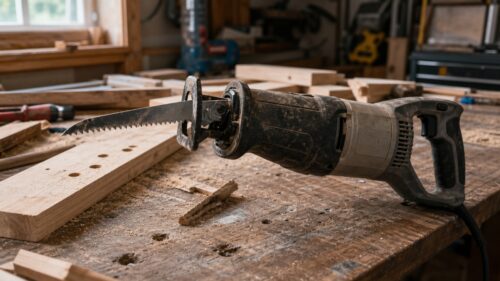
To understand what an orbital reciprocating saw is, start by recognizing that it is a power tool used for cutting various materials. It features orbital action, meaning the blade moves in an elliptical motion. This elliptical motion lifts the blade during non-cutting strokes, increasing cutting speed and efficiency. You activate this feature to cut faster, especially in wood or soft materials. Adjust the orbital setting depending on your needs; higher settings deliver more aggressive cuts and faster material removal. If ignored, your cuts become rougher and slower. Always check the orbital setting before work to match the material and desired cut quality for ideal results. The orbital action feature is what distinguishes an orbital saw from standard reciprocating saws.
How Does the Blade Move in Orbital Mode Versus Standard?
If you want to understand how the blade moves in an orbital reciprocating saw, observe the difference between orbital and standard modes.
Switch to orbital mode. The blade moves in an elliptical or circular pattern, lifting during the non-cutting stroke, so cutting efficiency increases with more aggressive material removal.
Switch to orbital mode for faster cuts on thick or tough materials by increasing aggressive material removal.
Or else, in standard mode, the blade moves in a straight back-and-forth motion, providing precise, cleaner cuts.
- Use orbital action when cutting through thick or tough material.
- Choose non-orbital for fine, controlled cuts.
- Failing to switch modes can reduce effectiveness or cause damage.
Understanding the tooth geometry and blade construction is crucial for optimizing performance, especially when cutting through hardened steel or rebar.
Why Does Orbital Action Make Cutting Wood Faster and More Aggressive?
Begin by understanding how orbital action increases cutting speed. This mode lifts the saw blade during the non-cutting stroke, so it contacts more material, speeding up material removal. The elliptical motion creates larger strokes, which clears wood debris quickly and reduces resistance. Additionally, the blade length and usable blade exposure determine how deep the saw can cut into the material, impacting efficiency.
- Use orbital action to cut wood faster, especially in demolition projects.
- Boost cutting efficiency by disrupting wood fibers with aggressive motion.
- Save effort by increasing material removal per stroke, up to 75% faster.
Activate orbital mode when speed and aggressive cuts are needed, making your work faster and more effective in cutting wood.
When Should You Use Orbital Mode on Your Reciprocating Saw?
When choosing to use orbital mode on a reciprocating saw, activate it when cutting through wood or fibrous materials to achieve faster, more aggressive cuts. Use orbital mode for cutting thick materials or during demolition work, especially with nail-embedded wood. Set the orbital mode to high for rough cuts or removing large sections quickly. Turn off orbital mode for precise cuts or delicate surfaces. Use lower settings for materials like plastics or metals to improve accuracy. Always test on scrap first. Failing to adapt prevents proper control and may damage your saw or workpiece. Adjust settings before starting to ensure safe, effective cuts. Blade flexibility can also influence cut quality, so selecting the appropriate blade and setting is crucial for optimal results.
How to Adjust Orbital Settings for Different Materials
To properly adjust the orbital settings on a reciprocating saw for different materials, follow a clear process. First, locate the dial or switch for adjusting orbital action, often near the handle or motor. Turn it to low or off for precise cuts on metals or plastics to reduce vibration. Increase the setting for faster cuts in wood or demolition work where speed is key. Fine-tune the orbital degree, partial or full, for the material’s thickness and density. Selecting the right reciprocating saw blade with appropriate durability and heat resistance is also essential for optimal performance. Always consult your manual for exact adjustment steps.
What Materials Benefit Most From Orbital Reciprocating Sawing?
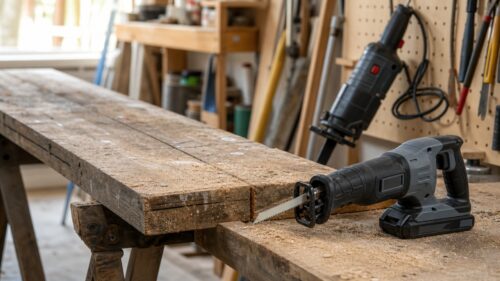
Certain materials benefit more from orbital reciprocating saw sawing because of their composition and work demands. Use orbital action on soft, fibrous materials like wood, plywood, and particleboard for faster, aggressive cuts. It speeds material removal in thick, layered substances such as demolition debris or nail-embedded wood. Focus on rough, not precise cuts, since orbital movement is less suited for metals or plastics. Push the saw steadily into the material until the blade moves smoothly through. Avoid forcing the blade, which can cause overheating or damage. Only use orbital action when cutting porous or less dense materials to maximize efficiency and minimize effort. Understanding blade durability can help in choosing the right blades for extended use.
Does Using Orbital Action Affect Blade Life or Maintenance?
Use orbital action carefully to prevent faster blade wear. Excessive or aggressive use accelerates blade wear, especially with abrasive or dense materials. When cutting softer materials like wood, orbital mode can cause quicker dulling due to increased friction and impact forces. Regular maintenance is needed if orbital action is used frequently, as vibrations can reduce blade stability.
Use orbital action sparingly to extend blade life and ensure safe, effective cuts.
- Limit orbital mode to necessary cuts.
- Adjust orbital settings for materials.
- Replace blades when they become dull.
Follow these steps to prolong blade life and keep your saw functioning correctly. Failing to do so can lead to costly replacements, increased downtime, and compromised safety.
How to Choose the Right Orbital Setting for Your Projects
How can you choose the best orbital setting for your project? Adjust the orbital setting based on material and cut requirements. Begin with a medium orbital setting to evaluate cut speed and finish. Increase it for aggressive wood or rough demolition, or lower it for metals and plastics. Use a fully orbital mode for fast work, but switch to straight or partial for cleaner cuts. Material adjustments are key; lower settings prevent overheating for delicate materials. Experiment with different levels until you find the right balance of cut speed and finish quality. Remember, improper adjustments can damage your blade or reduce control.
Can Using Orbital Action Damage Your Saw or Blade?
When using orbital action on a saw, be aware that it can cause increased wear on blades and saw parts due to the elliptical movement and vibration.
- Avoid keeping orbital mode at high settings for extended periods. This can lead to rapid blade damage or overheating.
- Use the appropriate orbital setting only for suitable materials; inappropriate use can cause uneven blade stress.
- Regularly check the saw for signs of wear to prevent reduced saw lifespan or internal damage.
Frequently Asked Questions
What Is the Difference Between Orbital and Reciprocating Saws?
Orbital saws differ from reciprocating models through blade compatibility, motor power, and brand comparison. They feature elliptical blade motion for faster cuts, contrasting with straight-line movement, offering less precision but increased efficiency, especially for demolition work.
What Should You Not Do With a Reciprocating Saw?
Reciprocating saws shouldn’t be used for cutting plastics, metals, or delicate materials without proper safety precautions, correct blade selection, and maintenance. Avoid excessive force and orbital mode for precise cuts, ensuring safety and equipment longevity.
Can I Use a Reciprocating Saw to Cut Tree Branches?
Like a modern-day Robin Hood, a reciprocating saw can facilitate outdoor saw tasks, including tree pruning and branch cutting. When equipped with suitable blades, it offers freedom in efficient, precise, and swift tree maintenance for those seeking independence from traditional tools.
What Are the Different Types of Reciprocating Saws?
Reciprocating saws vary by blade types, power sources, and features. Corded and cordless options offer mobility and strength, while safety tips guarantee effective, risk-free use, empowering users with versatile tools for diverse cutting tasks without restrictions.
Final Takeaways
Always choose the correct orbital setting for your project, so you cut efficiently without damaging the saw or blade. If the setting is too aggressive, it can wear out parts faster or cause unsafe cuts. Adjust the orbital mode based on material and thickness. Follow these steps precisely, or else risk poor results or equipment trouble. Keep your saw in good condition by maintaining the blade and cleaning it regularly to guarantee safe, smooth operation.

- What Is an Orbital Reciprocating Saw? - September 16, 2026
- Reciprocating Saw vs Sawzall: What’s the Difference? - September 16, 2026
- 5 Best Demolition Reciprocating Saw Blades for 2026 - July 9, 2026